
Install
While examling is in development, the most recently
pushed version can be installed through GitHub using the devtools
library.
install.packages("devtools")In order to gain access to this package’s source code, you’ll need a GitHub account and permission from a project administrator to access the repository. If haven’t worked with git before, check out https://docs.github.com/en/get-started/getting-started-with-git.
Once you have a git account, you need to create an authentication token so R can access your repositories. This just means signing in once to get a special password from GitHub that R can use from then on.
To start, input your GitHub username and the email associated with your account in their respective strings below, and run the code cell.
usethis::use_git_config(user.name = "<USERNAME>",
                        user.email = "<YOUR>@<EMAIL>.com")
usethis::create_github_token()
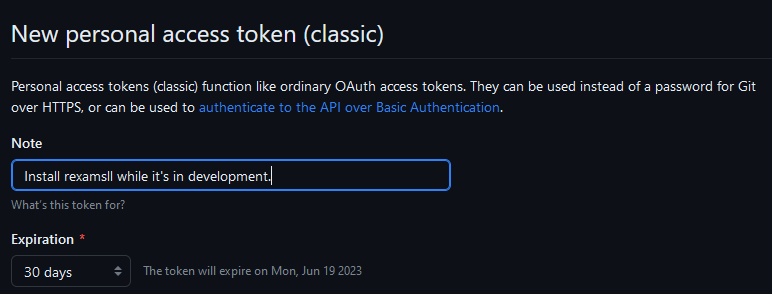
This should open your browser and ask you to sign into GitHub before bringing you to a page titled “New personal access token”.
Start by providing a reason for this token’s creation in the “Note” section. You can also change the expiration date on the token, though the default value of 30 days works perfectly well.
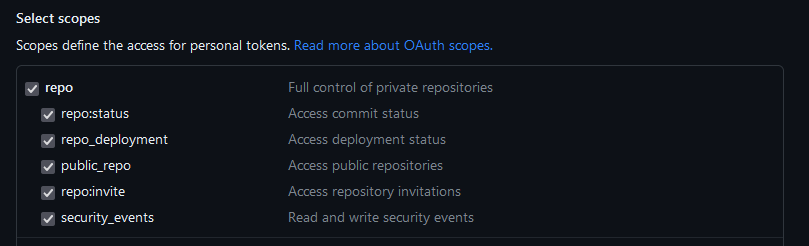
You should not need to change any of the selections in the “Select scopes” section. The “repo” section that is enabled by default should be all that you need to give R access to.
Now, click the green “Create Token” at the bottom of the page. You
should be presented with a page that looks like the following, with some
code that starts with ghp_. (Note that the code has been
censored in this example image.)
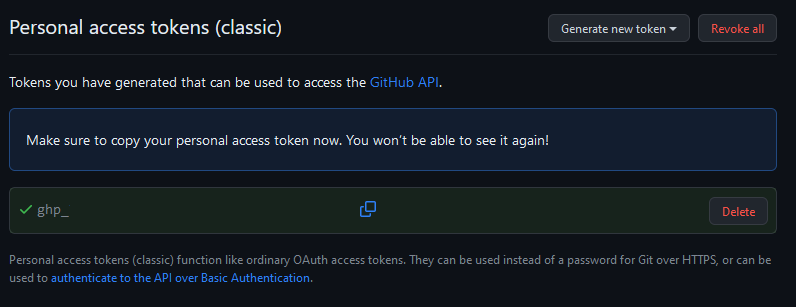
Copy this code and, optionally, save it somewhere secure to use
later. Paste it over the text that says
<AUTH CODE HERE> in the chunk below. Be sure to
delete the < and >; only your
authentication code should be within the quotes. Then run the code chunk
to install examling.
library(devtools)
install_github("examLing/examling", ref = "main",
               auth_token = "<AUTH CODE HERE>")
To check that examling was installed properly, run the following code chunk and make sure there are no errors.
library(examling)