
Spreadsheet Validation
When importing questions from a spreadsheet, like one created in
Google Sheets or Excel, examling goes through a list of
checks to validate the sheet. If any check fails, your function will
throw an error.
“Dataframe has no values.”
Example:
Error in examling:::validate_df(df) :
  Dataframe has no values. Did you select the wrong sheet?
This error occurs when you try to import data from a spreadsheet that with only a header. Double check that you pasted the correct url and that you selected the proper sheet index.
Also, it’s good to note that images don’t count as cell values.
“Error in if (nrow(df) == 0)…”
Example:
Error in if (nrow(df) == 0) stop("Dataframe has no values. Did you select the wrong sheet?") :
  argument is of length zero
In addition: Warning message:
No data found on worksheet.
This error occurs when you try to import data from a spreadsheet with no values (not even a header). Since there is no data in the sheet, R fails to load it at all.
Double check that you’re importing from the correct URL and sheet.
“Missing columns: …”
Example:
Error in examling:::validate_df(df) : Missing columns: type
Your header is missing at least one of the required columns:
- Question
- Type
- Correct
- Category
- Subcat
Add the listed headers to the first row of your sheet, and check Build the Sheet to learn how to use each of these columns.
Side note: Interestingly, these headers don’t need to be on the first row; they just need to be the first non-empty row of the sheet. You can have as many empty rows above them as you’d like.
“No answer columns found”
Example:
Error in examling:::validate_df(df) : No answer columns found
examling requires at least ONE column of the format
“Ans#” in the sheet, or it will throw this error.
At the moment, examling throws this error even if all
questions are of the string type, meaning the columns
are empty. In this case, just add a single “Ans1” column and leave it
blank.
“No values in answer columns.”
Example:
Error in which(na_rows & !sr_rows) %>% paste0(collapse = ", ") %>% sprintf(msg,  :
  Row 1 has no values in answer columns.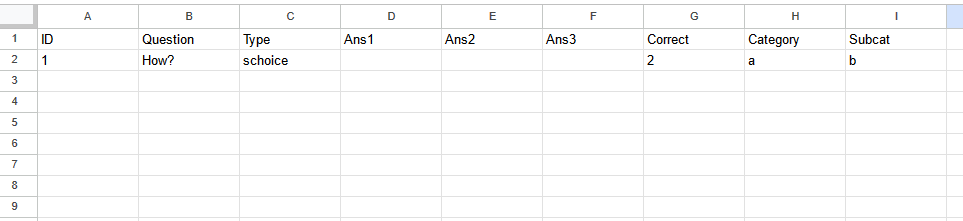
This error is thrown when a schoice or mchoice question has no answers to choose from. To fix this, either:
- Add answers to this row.
- Set the “Type” to string.